Shopify profit margin

See the hidden profit margin on every Shopify product.

Shopify shows revenue. Magnorus shows the profit you keep. Connect your store and see cost of goods, the products that lose money, and a profit and loss report you can use this week.

No credit card required

Connect with Shopify

Not a problem.

Register on our website and we will contact you to connect using the API. Your email is enough. A phone number is optional.

Register

Limited promotion. Starter and Growth include 14 30 days free, then $29.99 $9.99 or $49 a month. Yearly Starter is $290 $99.99. Agency is $199 a month. Shopify bills the plan. No credit card required to install. Customer names are salted before any AI check, so identifiable customer data is not sent to a model.

Example report · Surfboard Heaven

A week of net profit

What the full report opens with. These figures are an example, not your store.

$54,359Revenue
67%Product cost
5.9–23%Base margin
Base margin Same store, four different product margins.
After every cost The funboard and the wetsuit lose money. The longboard and shortboard stay profitable, at thinner margins.
See the full example report

What Magnorus does

From Shopify orders to a profit report.

01 · Connect

Read the store

Install from Shopify and approve access. No credit card required. Magnorus reads paid orders, products, and inventory cost, including history past 60 days.

02 · Calculate

Find the real margin

Base margin is price minus cost of goods. The margin after costs also removes fees, ad spend, salaries, rent, and other costs you add.

03 · Act

Get the weekly report

A profit and loss report names the products and the costs that changed the week, with a few actions for the store.

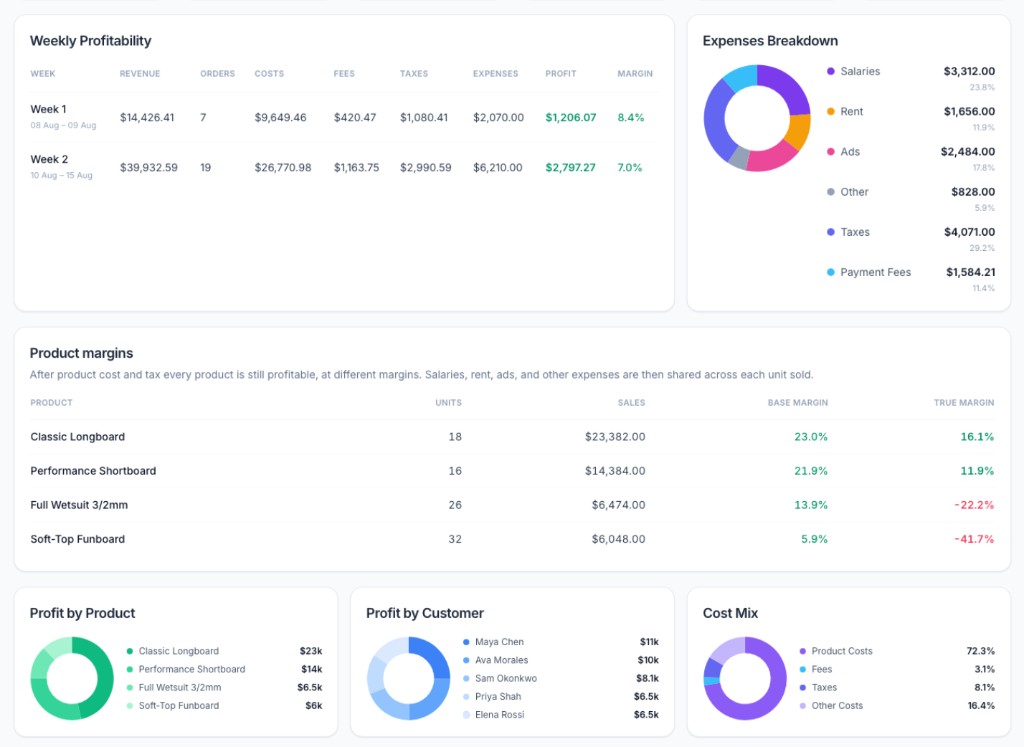
Example report for 8 to 15 August. Weekly profit, salaries, rent, and ads, and each product’s margin before and after those costs.
Surfboard Heaven, 8–15 Aug. After product cost, every product is still profitable. After salaries, rent, and ads, the wetsuit and the funboard lose money. Read the free audit.

Hidden product margins

The price looks fine. The product does not.

Product profitability is not one store-wide percentage. Surfboard Heaven took $54,359. Product cost was 67% of that. Base margins still ran from 5.9% to 23%. After shared costs, two products lost money.

Product Base margin After all costs
Classic Longboard 23% Stays profitable
Performance Shortboard Inside the range Profitable, thinner
Full Wetsuit 3/2mm Inside the range Loses money
Soft-Top Funboard 5.9% Loses money

Example Shopify profit report

See a slice here. Open the full report when you want the rest.

The live example covers revenue, net profit, cost of goods, ad spend, profit per order, and the product list. Nothing on that page is your data until you connect.

See the full example report

Also in the full report

  • Net profit and net profit margin
  • Cost of goods, fees, and ad spend
  • Profit per order and profit after ads
  • Which products sold, and what they cost
  • The few actions worth taking this week

Shopify net profit

Questions merchants ask before they connect.

How does the Shopify profit margin calculator work?

Connect Magnorus to Shopify. It reads paid orders, product prices, and inventory cost, then subtracts cost of goods, payment fees, ad spend, and expenses you add, such as salaries and rent. Each product gets a base margin and a margin after every cost.

What are hidden product margins?

A product can look profitable when you only subtract what it cost to buy. The hidden margin appears after shared costs are included. On the example store, base margins run from 5.9% to 23%. After salaries, rent, and ads, the funboard and the wetsuit lose money.

What is net profit versus Shopify revenue?

Shopify revenue is what customers paid. Net profit is what remains after cost of goods, fees, advertising, and the other costs of running the store. Magnorus puts that figure, and the products behind it, in one report.

Can I see which products lose money?

Yes. The report lists products with price, cost of goods, and margin. The example store sells a longboard, a shortboard, a wetsuit, and a funboard. The two boards stay profitable. The wetsuit and the funboard do not, once shared costs are included.

What if I do not use Shopify?

Not a problem. Register on our website with your email. We will contact you to connect your store using the API. A phone number is optional.
Connect Shopify. See the products that hide a loss.

One approval. The first profit report uses your orders, your cost of goods, and the costs you add. No credit card required.

Connect with Shopify