Ecommerce profit
Free profit margin calculator
Enter total revenue, cost of goods, and orders or items sold. Margin appears straight away, with the net average cost per order. Add taxes, delivery, ads, and fees to see the margin after expenses, ROAS, and the cost to acquire a customer.
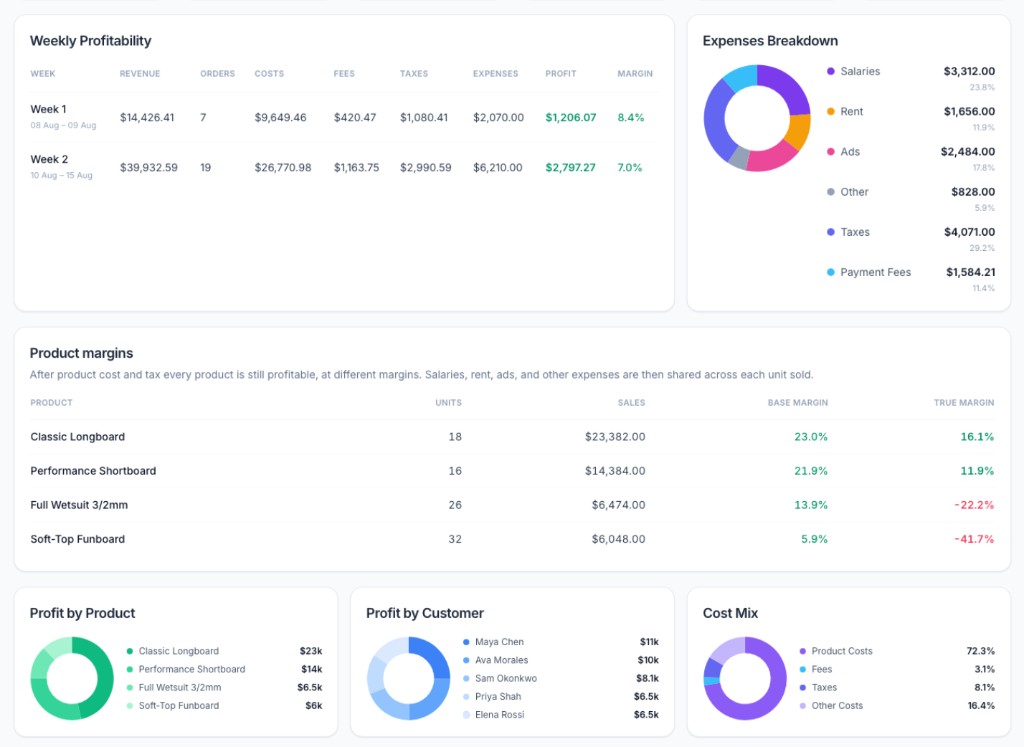
A product margin can still lose money after ads and rent. The store audit shows two products doing that. What is a good product margin?
After the total
Know the products with a low margin, or that lose money.
Connect Shopify, or connect through the API, to see more detail on the profitability of individual products. Magnorus helps you understand your margins, and suggests how to increase your store's profitability.
See this on your own products.
One connection. Magnorus reads paid orders and inventory cost, then shows the products that shrink the margin.
No credit card required
I don't have Shopify
Leave an email and we'll write back about connecting the store through the API.
Profitability metrics
Questions about store profitability.
How do you calculate profit margin?
Margin is revenue minus cost of goods, divided by revenue. A store with 10,000 in revenue and 6,000 in product cost has a 40% margin, before taxes, delivery, ads, and fees. Net average per order is the product cost divided by the number of orders. With 100 orders, that net average is 60. Switch to items sold to see the cost per item.
What is a good profit margin for an online store?
It depends on the store. A business with 100 million in sales and a 5% margin keeps 5 million. A smaller store may need a higher percent to cover its costs and still pay the owner. Compare the profit left after product cost, delivery, ads, and fees with what the business needs, and compare your products with each other.
What is margin after expenses?
Margin after expenses is the profit left once taxes, delivery, ads, processing fees, and any other cost you add are taken off, divided by revenue. Margin, on its own, is the figure before those costs.
What is ROAS?
ROAS is return on ad spend. It is revenue divided by ad spend. A ROAS of 4× means 4 in revenue for each 1 spent on ads. ROAS does not include product cost, so a high ROAS can still lose money after cost of goods and delivery. This calculator shows ROAS once you enter ads.
What is the price to acquire a customer?
The price to acquire a customer is ad spend divided by the number of orders. Compare it with the profit you keep on an order. If acquiring the order costs more than the order keeps, the ads are losing money. When you count items sold, the same ad spend is shown per item.
How do you find products with a negative margin?
A negative margin means the product brings in less than it costs. Start with revenue minus the cost of the product. Then take off delivery, ads, fees, and shared costs such as salaries and rent. A product can look fine on the first number and lose money on the second. The store total can still look healthy while that product spends the profit.
How can a store increase its profitability?
Raise prices where customers still buy, lower what the product costs, or cut spend that does not bring the sale, such as ads that do not return and delivery that is too high. Then change or pause the products that lose money after those costs. Fixing one losing product often lifts the margin of the whole store.
How do you optimise an online store for profit?
Look at profit per order, not only revenue. Compare the cost to acquire a customer with what the order keeps, and compare ROAS with product cost. Keep the products that stay profitable after delivery, ads, and fees. Change the price, the cost, or the ad spend on the ones that do not.
What tools show more data about a store's profit?
A calculator shows the store total. A profit app connected to the store shows the same numbers per product and per order, after shared costs. Magnorus connects to Shopify, or through an API if the store is somewhere else, and suggests where the margin can improve. It is free for now.
Pricing
Free while you tell us what is missing.
Use Magnorus at no charge. In return, tell us what helped and which features you still need.
Comparison to other applications:
| Magnorus | TrueProfit | BeProfit | |
|---|---|---|---|
| Price / month | Free with feedback | From $35 | From $49 |
| Orders on that plan | Your store | 300 | 450 |
| How long it stays free | While you reply | 14 days | 14 days |
TrueProfit and BeProfit prices are their public Shopify App Store listings on 20 Oct 2026. Plans change. This compares the price, not the product. Read the TrueProfit alternative or the BeProfit alternative.